Consent Process –Revoke consent
PLEASE NOTE:
• Screen shots may vary due to differing software versions.
• In VESTA, any consent recorded for the primary client will cover all children in the household under the age of 18.
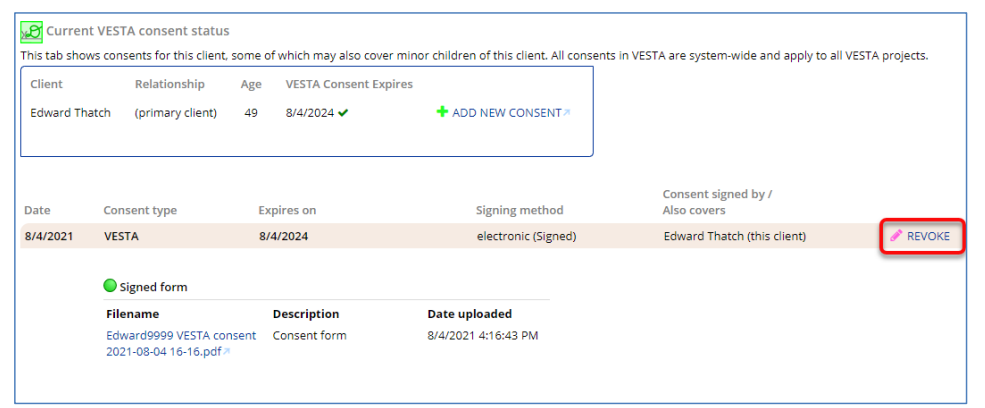
1. Start in the record for the primary client. Click the Consents tab located on the left side of the screen. TheCurrent VESTA consent status screen opens.
• This screen shows an overview of VESTA consents for this client and their household members.
• Below the overview are consents signed by this client; some may also cover minor household
members.
2. Click Revoke.
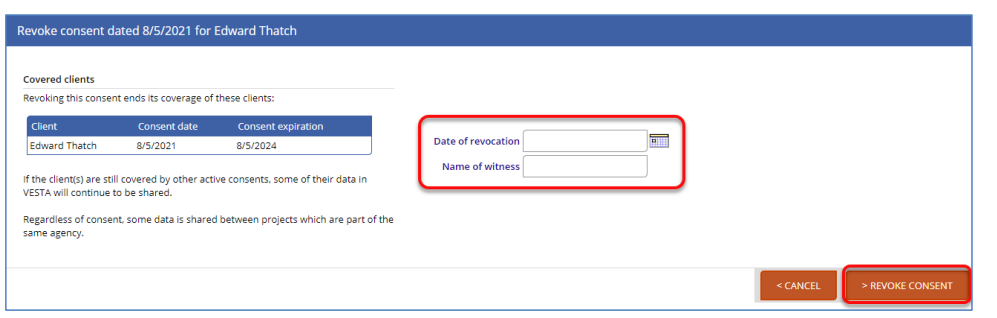
3. Enter the Date of revocation and your name. Click Revoke Consent.
4. VESTA will return you to the client’s Consents tab which will display the consent that was revoked.
