
All Permanent House and Rapid ReHousing projects in VESTA should use the Rental Data form to record unit, landlord, and rental/payment information. This important form will interact with VESTA and the Balance of State Coordinated Entry system in multiple dynamic ways, and will also be important in CoC-wide reporting.
Rental Data form(s) only need to be recorded on the Head of Household's record.
A new rental form must be added when:
Client moves to a new unit or address.
Rental Payment or Subsidy amount has changed or been recalculated.
Unit has a new landlord or they have new contact information.
* If a client's rental information was recorded incorrectly, edit and correct the existing record, rather than adding a new one.
Information Required on the Rental Data Form
- Dates
Complete the top portion of the form- Date will automatically be set for today.
- Effective Date is the first date that the information being recorded goes into effect, i.e. the first month's rent due date. For reference, the clients' move-in date is displayed.
- Unit Information
- Record the complete address of the client's rental unit. Be sure to use proper city names and accurate zip codes. If you or your client are unsure about the correct formatting of their address, clicking the street sign icon
 will open up Google Maps in a new browser window.
 - Select the correct number of Bedrooms from the drop-down list. SROs and studio apartments should be recorded as 0 bedrooms.
- Record the complete address of the client's rental unit. Be sure to use proper city names and accurate zip codes. If you or your client are unsure about the correct formatting of their address, clicking the street sign icon
- Rental / Payment Information
- Rent - subsidy amount: This is the amount of any leasing or rental assistance that the client is receiving from this project.
- Rent - client amount: This is the amount that the client/household is responsible for paying toward rent each month.
- Rent amount: This line is auto-totaled from the 'subsidy amount' and 'client amount' fields above - this total should reflect the entire rent, so if the amount being displayed is not correct, make corrections in the above fields.
- Irregular amount paid by agency? Some examples of irregular payments include late fees, payments for damages, and pro-rated rents - any payment made by this project on behalf of the client that is not a regular deposit or rent would go here.
- Irregular payment amount: Only record payments made by the project
- Date irregular amount billed: Record the date the irregular payment was made.
- Utility subsidy allowance: Record utility allowance payments made only by this project.
- Deposit paid by agency?
- Agency deposit amount: Only record deposits paid for by this project.
- Date deposit billed: Record the date the deposit was paid.
- Landlord Information
- Complete this section by recording the Landlord's address, phone, and email address.
- Notes
- Rental notes can be added to this section.
- SAVE> once complete, click the orange Save button in the lower right corner of the screen.
Rental data forms do not have an end date. The most recently added rental data form will be the active form until it is superseded or the client exits the project.
If any of the information recorded was incorrect you may  EDIT the form to fix mistakes.
Please record a NEW Rental Data form every time your clients' rental information changes.
Recording the initial Rental Data Form
A client’s first Rental Data Form should be completed at the point the client moves into permanent housing and the Housing Move-in Date is recorded.
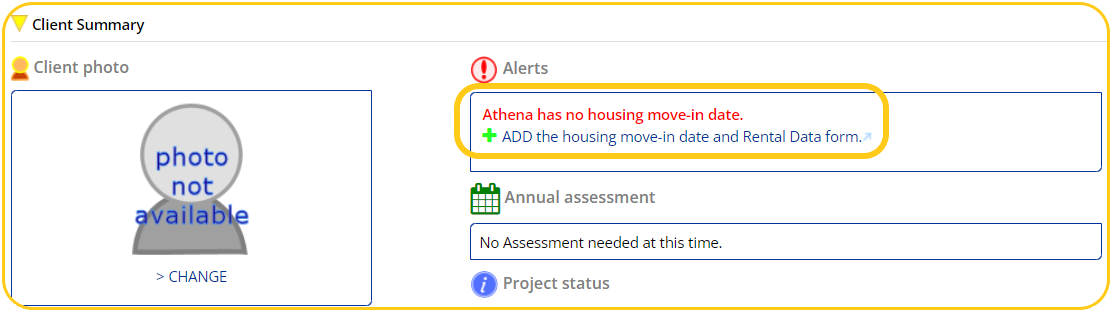
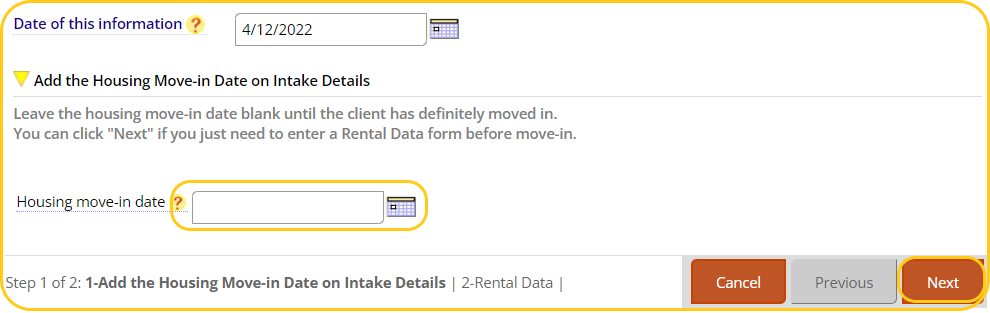
Record a client’s Housing Move-in Date and Rental Data form by navigating to the Client Summary page and clicking on the +ADD the housing move-in date and Rental Data form link.
Enter the Housing Move-In Date and click Next to open the Rental Data Form
When to ADD a new Rental Data Form
A new form must be created if a client has a Move-in Date recorded but no rental data form or if a client’s subsidy amount changes. To create or add a new Rental Data Form, navigate to the Client Summary Page to ADD a new Rental Data Form.

- Set the effective date to the 1st of the month in which the client began receiving assistance with program funds or the month the subsidy amount changed.
- Fill out and verify all information.
- Click Save to close and save the form.
- Create as many Rental Data Forms as needed to account for all client subsidy changes.
If the client stops receiving rental assistance but remains active in the project, a new form should be filled out with $0 recorded for the subsidy amount. If assistance resumes, a new form should be made reflecting the new information.
*2022 CE Implementation Note: Clients only need an accurate Rental Data Form as of May 1st, 2022. No regular or irregular payments made before 5/1/22 need to be recorded, however any payments made after this date should be reflected in a Rental Data Form.
Irregular Payment
If the subsidy amount remains the same but an irregular payment is made during the client’s enrollment, a new rental data form must be added.
- Set the effective date to the date this form is updated.
- Do not change the subsidy or client rent amounts
- Set irregular amount paid by agency to “yes”
- Record the amount of the irregular payment
Record the date the irregular payment was made